Building a custom OpenAPI layout in Fumadocs
June 14, 2026
The problem with most OpenAPI generators is that they assume you're building a traditional documentation portal. Every operation gets its own page, its own route, and its own spot in the sidebar. That works well when you're documenting a large API and developers are usually searching for a specific endpoint. It doesn't work nearly as well when you want to present an API as a cohesive product.
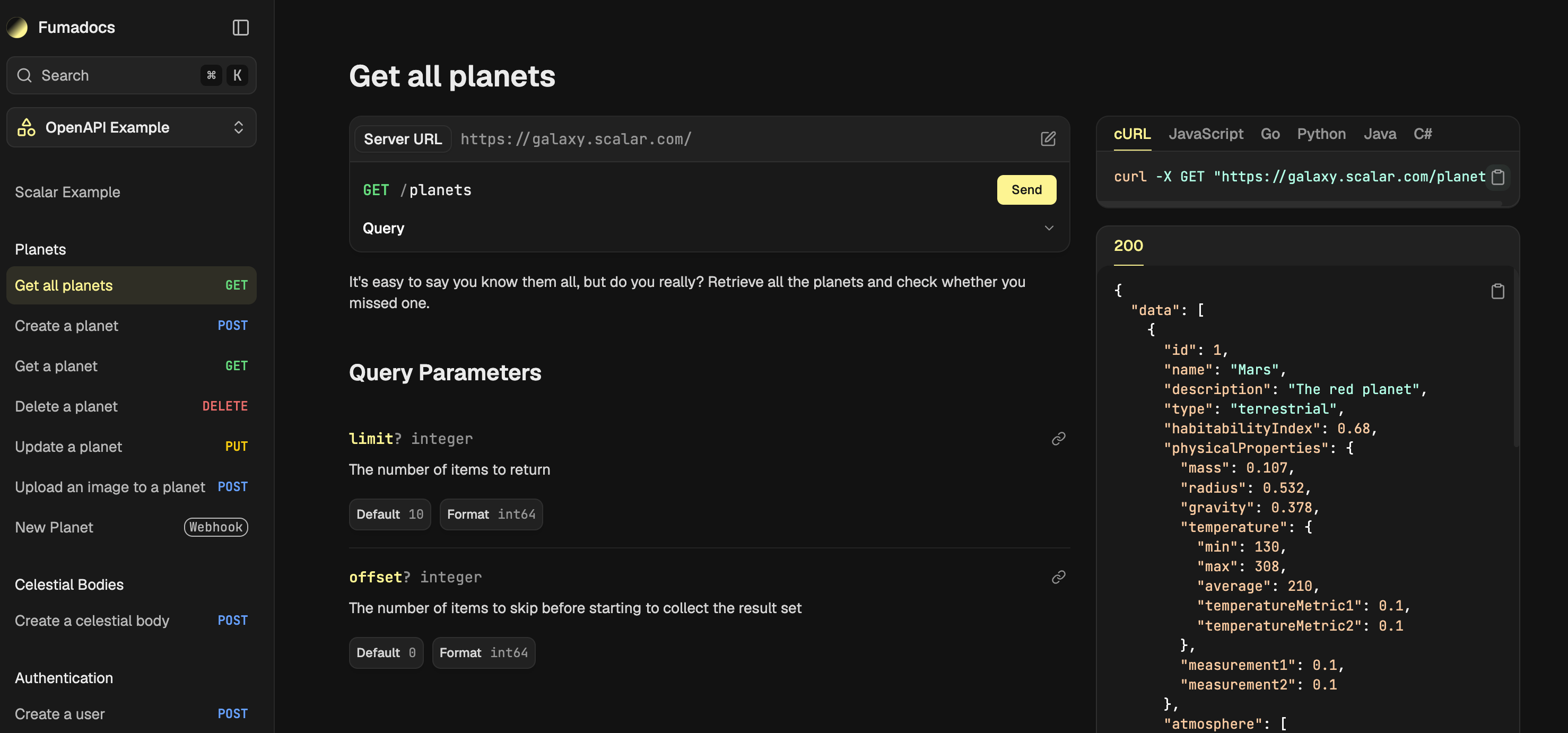
I ran into this while building a portfolio site with Fumadocs. Instead of spreading endpoints across dozens of pages, I wanted a single reference page that displayed the entire specification in one place. The layout I was after had documentation on the left and code samples with an interactive playground on the right, with every endpoint reachable without navigating between routes.
Fumadocs doesn't provide this out of the box. Its default OpenAPI integration is similar to the rest of the industry, but it wasn't the experience I was after. So I decided to build it myself.
The approach ended up being surprisingly flexible. Although I originally created it for a portfolio project, the same routing and rendering logic works just as well for a full documentation portal because it isn't tied to a specific site structure. Once the system parses the OpenAPI spec, everything is generated from it.
From there, the challenge became figuring out how to turn a route-per-operation system into a single-page API reference without fighting Fumadocs' existing architecture.
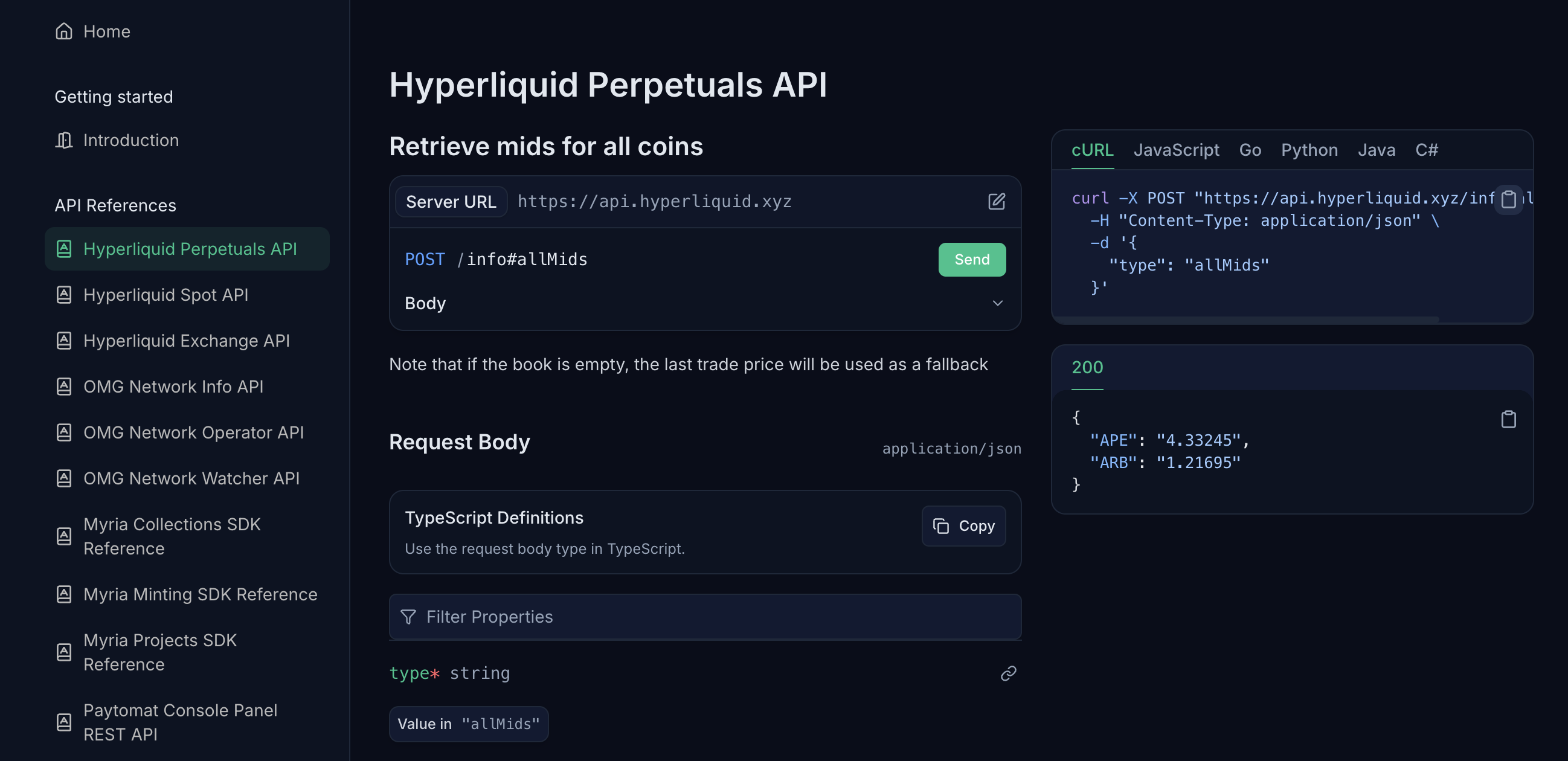
My own use case is six files across two projects: three Hyperliquid APIs (perps, spot, exchange) and three OMG Network APIs (info, operator, watcher). Each one needed its own page at a clean URL, with the two-column layout and the interactive playground that come standard with Fumadocs OpenAPI.
Getting there meant working against the grain of how Fumadocs generates OpenAPI pages in the first place, so that's where the actual build starts.
Why the default setup wasn't enough
Fumadocs OpenAPI generates its pages from the dereferenced schema during the source loader step, and the unit it generates a page for is a single operation. There's no concept anywhere in the library of a "spec group," a page that renders every operation in one file together.
To get that page, I needed a route that doesn't correspond to anything the loader produces. I had to invent it and wire it in by hand, on top of the routes Fumadocs already generates for me.
The site exports statically, so every route the app will ever serve has to be declared at build time, with no fallback to catch anything I missed. That meant the new group routes needed an entry in generateStaticParams() alongside the auto-generated operation params, one per spec:
const openapiGroupSlugs = Object.keys(SPECS).map((key) => ({
  slug: ['api', key],
}));
Next, I created a single SPECS object that maps each API identifier to its display title and the YAML file on disk:
export const SPECS = {
  'hyperliquid-perps':    { title: 'Hyperliquid Perpetuals API', file: 'hyperliquid-perps.yaml' },
  'hyperliquid-spot':     { title: 'Hyperliquid Spot API',       file: 'hyperliquid-spot.yaml' },
  'hyperliquid-exchange': { title: 'Hyperliquid Exchange API',   file: 'hyperliquid-exchange.yaml' },
  'omg-info':             { title: 'OMG Network Info API',       file: 'omg-info.yaml' },
  'omg-operator':         { title: 'OMG Network Operator API',   file: 'omg-operator.yaml' },
  'omg-watcher':          { title: 'OMG Network Watcher API',    file: 'omg-watcher.yaml' },
} as const;

export function getSpecPath(slug: string): string | undefined {
  const spec = SPECS[slug as keyof typeof SPECS];
  return spec ? path.join(process.cwd(), 'content/api', spec.file) : undefined;
}

export function getSpecTitle(slug: string): string | undefined {
  return SPECS[slug as keyof typeof SPECS]?.title;
}
Because the route handler and the sidebar tree both read from the same SPECS object, adding a seventh spec is now one line: a new entry in the object. The helpers keep callers type-safe without dragging the full record around. The harder part was never the config. It was getting the route to render the right thing once that URL existed.
What I tried before reading the schema directly
My first attempt was to find whatever function Fumadocs OpenAPI uses internally to turn a parsed operation into props for APIPage, import it directly, and call it once per operation inside my own loop. The library already does this work somewhere, since it's how the default per-operation pages render. I found the function in the package source and wired it into my group route.
That attempt didn't survive a production build. The import resolved fine in dev, then failed under Turbopack once I tried to build for static export. I don't have the exact error text anymore since I dropped the approach the same afternoon, but the shape of it was a module resolution failure: Turbopack couldn't trace the internal file path I was reaching into from outside the package's public exports. A Webpack-based build might have handled it differently. I didn't test that, because by then I'd found a second approach that didn't depend on undocumented internals at all.
createOpenAPI exposes a getSchema() method that returns the same dereferenced schema the library uses internally, just without the part that turns it into page props. So instead of importing Fumadocs' internals, I read the schema myself and built the operations list by hand:
const schema = await openapi.getSchema(specPath);
const { dereferenced } = schema;
const methodKeys = ['get', 'put', 'post', 'delete', 'options', 'head', 'patch', 'trace'] as const;
...
Webhooks get the same treatment from dereferenced.webhooks. The resulting arrays go straight into APIPage alongside document and showTitle, and the group page renders every operation in the spec on one route. The shape <APIPage> wants is the public OperationItem and WebhookItem types from fumadocs-openapi/ui: { path, method } for operations and { name, method } for webhooks. That's all the component needs to look up the operation in the dereferenced schema it already loaded for document.
I kept the default per-operation pages working too, since deep links to a single endpoint are still useful elsewhere on the site. Those still come from source.getPage(slug) and openapiData.getAPIPageProps(), completely unchanged. Both routing paths live in the same page.tsx, one manual branch for spec group pages and one untouched branch for everything Fumadocs already generates.
That one CSS import
The group page rendered with every operation in place, but the UI was rendering incorrectly. Everything sat in a single column instead of the two-column docs-left, code-right layout I'd been building toward, and nothing in the props or the component looked off. It wasn't a long search, maybe fifteen minutes, but it was the kind of fifteen minutes that feels longer because nothing about the symptom points at the cause.
fumadocs-openapi ships its own CSS preset, separate from the core Fumadocs UI preset. Importing the UI preset alone gets you working components in the wrong format, with no runtime warning that a stylesheet is missing.
The fix was one more import in global.css:
@import 'fumadocs-openapi/css/preset.css';That line turns on the desired layout, the request and response panels, and the language tabs for code samples. I'd assumed the UI preset covered anything OpenAPI-related too, since the component itself ships from fumadocs-openapi. It doesn't, and it's an easy one to miss if you're not specifically looking for a second preset file.
How to set this up on your own Fumadocs site
This is the full path from a bare Fumadocs install to a working spec group page, in the order I'd build it again.
Define your spec config
Create one file with a single SPECS object that maps each short key to a YAML filename and a display title. Helpers turn the key into a filesystem path or a human-readable title; the sidebar tree and the route handler both read from the same object, so this is the only place a new spec gets added later.
// lib/openapi.ts
import { createOpenAPI } from 'fumadocs-openapi/server';
import path from 'node:path';

export const SPECS = {
  'your-spec-key': { title: 'Your API name', file: 'your-spec.yaml' },
} as const;

export function getSpecPath(slug: string): string | undefined {
  const spec = SPECS[slug as keyof typeof SPECS];
  return spec ? path.join(process.cwd(), 'content/api', spec.file) : undefined;
}

export function getSpecTitle(slug: string): string | undefined {
  return SPECS[slug as keyof typeof SPECS]?.title;
}

export const openapi = createOpenAPI({
  input: Object.values(SPECS).map((spec) =>
    path.join(process.cwd(), 'content/api', spec.file),
  ),
});
Wire the OpenAPI source into your content source
openapiSource() generates the default per-operation pages from your specs. Merge its files with whatever else your loader() already serves, and register the plugins it needs.
// lib/source.ts
import { loader } from 'fumadocs-core/source';
import { openapiPlugin, openapiSource } from 'fumadocs-openapi/server';
import { openapi } from '@/lib/openapi';

const openapiFiles = await openapiSource(openapi, {
  baseDir: 'api',
});

export const source = loader({
  baseUrl: '/docs',
  source: {
    files: [
      // ...your existing docs files,
      ...openapiFiles.files,
    ],
  },
  plugins: [openapiPlugin()],
});
Create a shared APIPage component
Wrap createAPIPage once and reuse it in both the group route and the default per-operation route, so the two stay visually consistent.
// components/api-page.tsx
import { openapi } from '@/lib/openapi';
import { createAPIPage } from 'fumadocs-openapi/ui';

export const APIPage = createAPIPage(openapi, {});
Build the group route from the dereferenced schema
In your catch-all page, dispatch the group route to a renderSpecGroup() helper before falling through to the default Fumadocs page lookup. The helper reads the schema with getSchema(), walks every HTTP method on every path, and passes the resulting OperationItem list straight into APIPage. Note that OperationItem is just { path, method }. <APIPage> already has the dereferenced schema via document, so it doesn't need anything else.
// app/[[...slug]]/page.tsx
import type { OperationItem, WebhookItem } from 'fumadocs-openapi/ui';
import { getSpecPath, getSpecTitle, openapi, SPECS } from '@/lib/openapi';
import { APIPage } from '@/components/api-page';
import { notFound } from 'next/navigation';

const HTTP_METHODS = [
  'get', 'put', 'post', 'delete', 'options', 'head', 'patch', 'trace',
] as const;

async function renderSpecGroup(specSlug: string) {
  const specPath = getSpecPath(specSlug);
  const title = getSpecTitle(specSlug);
  if (!specPath || !title) notFound();

  const { dereferenced } = await openapi.getSchema(specPath);

  const operations: OperationItem[] = [];
  for (const [path, pathItem] of Object.entries(dereferenced.paths ?? {})) {
    if (!pathItem) continue;
    for (const method of HTTP_METHODS) {
      if ((pathItem as Record<string, unknown>)[method]) {
        operations.push({ path, method });
      }
    }
  }

  const webhooks: WebhookItem[] = [];
  for (const [name, pathItem] of Object.entries(
    (dereferenced as { webhooks?: Record<string, Record<string, unknown>> }).webhooks ?? {},
  )) {
    if (!pathItem) continue;
    for (const method of HTTP_METHODS) {
      if (pathItem[method]) webhooks.push({ name, method });
    }
  }

  return (
    <APIPage
      document={specPath}
      operations={operations}
      webhooks={webhooks}
      showTitle
      showDescription
    />
  );
}

export default async function Page(props: { params: Promise<{ slug?: string[] }> }) {
  const { slug = [] } = await props.params;

  if (slug[0] === 'api' && slug.length === 2) {
    return renderSpecGroup(slug[1]);
  }

  // fall through to your existing source.getPage(slug) logic
}
Register every spec as a static param
If the site exports statically, the group routes need to be declared explicitly. They won't be picked up by source.generateParams(), since they don't correspond to anything the loader generated.
export async function generateStaticParams() {
  const params = source.generateParams();

  const openapiGroupSlugs = Object.keys(SPECS).map((key) => ({
    slug: ['api', key],
  }));

  return [...openapiGroupSlugs, ...params];
}
Match generateMetadata to the same route check
Whatever condition you use to detect the group route in page.tsx, use the exact same condition in generateMetadata. It's easy to write one as slug[0] === 'api' and the other as slug[0] === 'openapi', since you'll be thinking in terms of "the OpenAPI route" in one place and "the /api/ URL" in the other. They need to be the same string.
export async function generateMetadata({ params }: { params: Promise<{ slug?: string[] }> }) {
  const { slug = [] } = await params;

  if (slug[0] === 'api' && slug.length === 2) {
    const title = getSpecTitle(slug[1]);
    return title ? { title } : {};
  }

  // fall through to your existing metadata logic
}
Import the OpenAPI CSS preset
This is the one easy to skip, since the component itself ships from fumadocs-openapi, so it's reasonable to assume the core UI preset already covers it.
@import 'fumadocs-ui/css/preset.css';
@import 'fumadocs-openapi/css/preset.css';
If you follow those steps, every spec in SPECS will get a full reference page at /api/<spec-key>, with the two-column layout, the live playground, and multi-language code samples.
Summary
As a result, six specs are live on the portfolio right now, and the setup is generic enough that I'm planning to reuse it as-is for client documentation portals, which was the actual point of building it this way instead of hardcoding it to my own six files. The config-driven part held up well: every spec I've added since the first one really has been one line in SPECS.
The parts worth watching if you're adapting this yourself are the two I ran into directly, the route name needing to match everywhere it's checked, and the CSS preset needing its own import. Neither is hard once you know to look for it. Both are the kind of thing you only find by hitting them once.